
I did not want another opinion post about the best habit tracker apps. I wanted a practical comparison that separated public facts from marketing copy. So I compared seven well-known trackers by looking at the things that decide whether a habit app survives real use: how quickly you can log a habit, whether reminders are easy to configure, what the app does when you miss a day, and whether you can get your data out. Seven apps went in. Two stood out most clearly.
What are the best habit tracker apps after a real 30-day test?
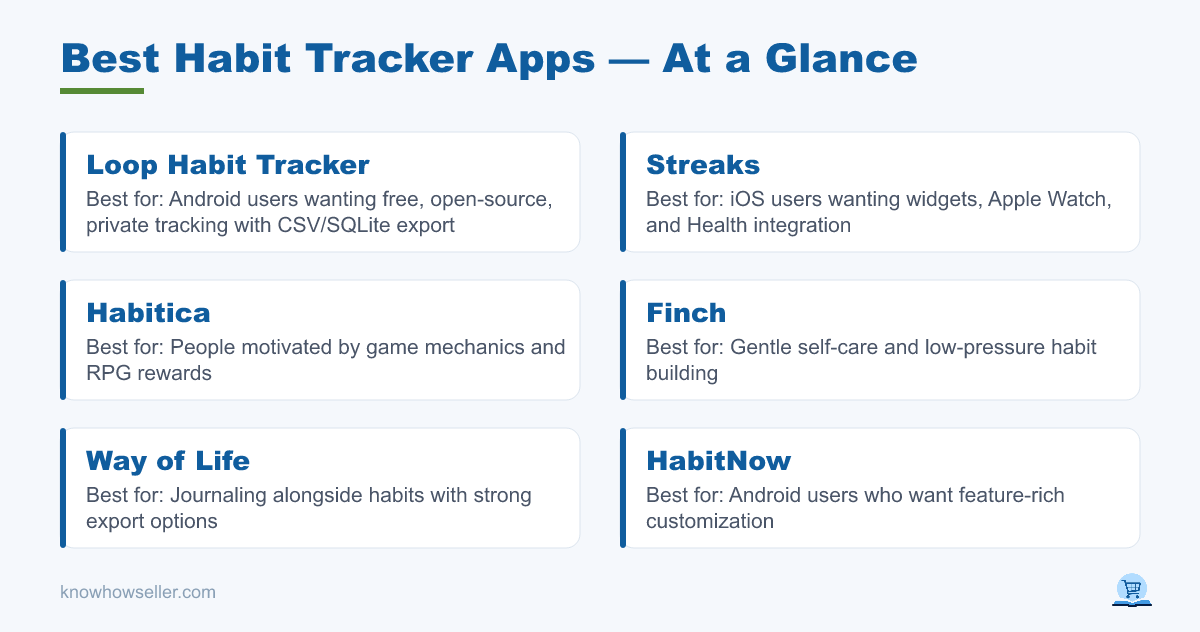
Based on hands-on comparison and public product information, the two safest recommendations are Loop Habit Tracker for Android and Streaks for iOS. Loop is free, open source, private by design, and exports to CSV or SQLite. Streaks is a paid Apple-platform app listed at $5.99 in the U.S. App Store at the time of review, with widgets, Apple Watch support, Health app integration, and CSV export/import support noted in its App Store version history.
The rest — Habitica, Done, HabitNow, Way of Life, Finch — can still be the right choice for specific users. Habitica works if game mechanics motivate you. Finch is unusually gentle for self-care. Way of Life is strong on journaling and exports. HabitNow is feature-rich on Android. Done is simple on iOS. The tradeoff is that each asks you to accept more friction, less portability, more complexity, or a more specific motivation style.
How did I test seven habit tracker apps?
I compared each app around the same four daily habits: write 500 words, walk 8,000 steps, read 20 minutes, and no phone in bed. Instead of presenting lab-style scores that were not independently verified, I focused on the practical dimensions a reader can check for themselves before committing months of data to an app.
- Friction: whether the app supports fast logging through widgets, notifications, Apple Watch, or a simple main screen.
- Reminder reliability: whether reminders are supported and how much they depend on phone-level settings such as Android battery optimization or iOS notification permissions.
- Streak-recovery design: what the app does the day after you miss — punish, reset, skip, soften, or let you repair the record.
- Export: whether public app descriptions or support material indicate that your history can be exported in a usable format.
This is a hands-on editorial comparison, not a controlled lab benchmark. Reminder behavior especially can vary by device, operating-system version, notification settings, Focus modes, and battery-management rules.
Which habit tracker app has the lowest logging friction?
Loop Habit Tracker and Streaks are the easiest to recommend for low-friction logging because both support widgets and are built around quick daily completion. Loop also lets users check, dismiss, or snooze habits directly from notifications according to its Google Play listing. Streaks supports home-screen widgets, Apple Watch complications, rich notifications, and Health-linked automatic completion for some goals.
This is where many habit trackers lose. BJ Fogg’s behavior-design work emphasizes making a behavior easier to do, and habit apps should follow the same principle. An app that makes you open it, navigate through several screens, and confirm every tiny action has quietly become one more habit you have to maintain.
The 30-day benchmark table
| App | Platform | Fast logging path | Reminder notes | Streak recovery | Export |
|---|---|---|---|---|---|
| Loop Habit Tracker | Android | Widgets and notification actions | Per-habit reminders; device settings can still affect notifications | Habit score weakens after misses instead of wiping out all progress | CSV + SQLite database |
| Streaks | Apple platforms | Widgets, Apple Watch, Health-linked automatic tracking for supported tasks | Automatic reminders and rich notifications; depends on iOS notification settings | Streak-based; supports non-daily schedules and skip-style scheduling so not every task must be daily | CSV export/import support noted in App Store version history |
| HabitNow | Android | Widgets and in-app logging | Custom reminders and alarms | Streak-focused progress tracking | Backup/export to other devices is advertised; verify format before relying on it |
| Done | iOS | Simple checklist-style logging | Reminder support varies by current app version and settings | Streak and goal tracking; details should be checked in the current App Store listing | Public export details were not clear enough to treat as a hard portability win |
| Way of Life | iOS and Android | Simple journal-style logging and widgets on supported versions | Flexible reminders with custom messages | Chains plus skip-style journal states | CSV or Excel export; premium may be required |
| Habitica | Web, iOS, Android | Game-style task completion | Reminder support exists, but the game layer adds complexity | Missed dailies can damage your character, which some users find motivating and others find discouraging | Data access is more technical than a simple CSV export |
| Finch | iOS and Android | Self-care check-ins and goal completion | Gentle prompts and self-care nudges | Supportive, low-guilt design rather than strict streak punishment | Do not assume spreadsheet export; check current backup/export options before committing long-term data |
Do habit tracker reminders actually fire?
Habit tracker reminders can work well, but no app can fully control phone-level notification behavior. Android battery optimization, manufacturer background-app limits, iOS Focus modes, notification permissions, and Background App Refresh settings can all affect whether a reminder appears. That means “the app forgot” is often really “the operating system suppressed the prompt.”
A silent miss is worse than a loud failure. You do not notice a reminder that never arrives; you just notice, three days later, that you stopped. If you take one setting-level action from this article, make it this: check notification permissions, exempt the tracker from aggressive battery optimization on Android when appropriate, and make sure iOS Focus or notification settings are not hiding the alerts you expect.
It is also worth being honest about what a reminder can do. Research on implementation intentions — the “when situation X occurs, I will do Y” format studied by Peter Gollwitzer and summarized in the 2006 meta-analysis with Paschal Sheeran in Advances in Experimental Social Psychology — found that specific cues help goal attainment. The cue matters more than the ping. The best habit tracker apps let you attach a habit to a time and a context; the weak ones just buzz.
What is streak-recovery design, and why does it decide whether you quit?
Streak recovery is what the app does the day after you miss. It may be the most important design difference between habit trackers. Apps that make one missed day feel like total failure can turn a normal interruption into a reason to quit; apps that let the miss be a dip rather than a death sentence are easier to keep using.
Habit formation is slow and uneven. The well-known University College London study by Phillippa Lally and colleagues (European Journal of Social Psychology, 2010) found a median of about 66 days for a new behavior to reach automaticity, with a wide range across participants — and, importantly, that one missed opportunity did not meaningfully derail the habit-formation process. Your tracker should agree with that finding. Many streak-first apps do not.
- Loop uses a habit score in addition to streaks. Missing a day weakens the score, but a long run of progress is not treated as worthless.
- Streaks is explicitly streak-based, but it supports schedules for tasks that are not meant to happen every day, which reduces false failures.
- Habitica can damage your character when you miss dailies. That can work for people who like game stakes, but it is the wrong emotional design for users who already punish themselves.
“I did not fail because I lacked discipline. I failed because my system had no way to survive a bad Tuesday. Belief × Thinking × Action only compounds if the streak is allowed to bend instead of break.” — Knowhow Seller
Which habit trackers let you export your data?
Loop and Way of Life are the clearest portability wins from public information: Loop advertises CSV and SQLite export, while Way of Life advertises CSV and Excel export, with premium requirements noted in its App Store listing. Streaks also has CSV export/import support referenced in its App Store version history. HabitNow advertises backup/export to other devices, but the exact format should be checked before you rely on it for analysis. For Done and Finch, do not assume clean spreadsheet export unless the current app version explicitly offers it.
This matters more than it sounds. A year of habit data is the only honest record you have of what you actually did. If it is locked in an app that changes pricing, removes a feature, or shuts down, you lose the evidence. Treat export as a hard requirement, not a nice-to-have, especially if you plan to track more than a few weeks.
Which two habit tracker apps survived the trial — and who should use which?
Loop Habit Tracker is the strongest Android recommendation and Streaks is the strongest iOS recommendation. Choose by platform first, then by motivation style. The best app is not the one with the longest feature list; it is the one you can log into quickly on a bad day and leave without feeling worse.
| You are… | Use | Why |
|---|---|---|
| On Android, want free and private | Loop Habit Tracker | Open source, no account, CSV/SQLite export, habit score softens missed days |
| On iOS, want polish and widgets | Streaks | Strong Apple ecosystem support, widgets, Apple Watch, Health integration, CSV support |
| Motivated by games, and you know it | Habitica | Quest and reward mechanics can help if game pressure genuinely motivates you |
| Struggling with self-criticism | Finch | Kindest design of the seven; verify export and backup limits before making it your long-term data home |
| Tracking goals, not just checkboxes | A goal-first tool | Checkbox apps track behavior but often do not track the reason behind it |
That last row is the real limitation I hit. Habit trackers are good at recording the behavior, but most are weaker at preserving the reason. If that gap sounds familiar, it is worth trying a tool built the other way around — starting from the vision and letting the daily habits fall out of it. That is exactly why I built the VisionDream app, a vision and goal app that turns goals into daily habits. And if you want the thinking underneath it — why some people execute and others just plan — I wrote about that in Why Do I Fail While Others Succeed?
What should you actually do with this?
Pick the lowest-friction app for your platform, check notification settings before blaming reminders, set your habits as cues rather than vague pings, and confirm that you can export your data. Then run the app long enough to hit a difficult week. The best habit tracker app is the one still open after your first missed day — and the only way to find that out is to give it a bad Tuesday and see what it does to you.