

Most advice about long-form AI writing assumes you paste a giant outline into one chat window and pray. That is exactly the approach that fails past about a chapter. This is a working method built around two boring ideas: split source files and an automatic build step. It runs on free AI tiers and free open-source tooling.
How do you use AI for free to write a book-length technical manuscript in one day?
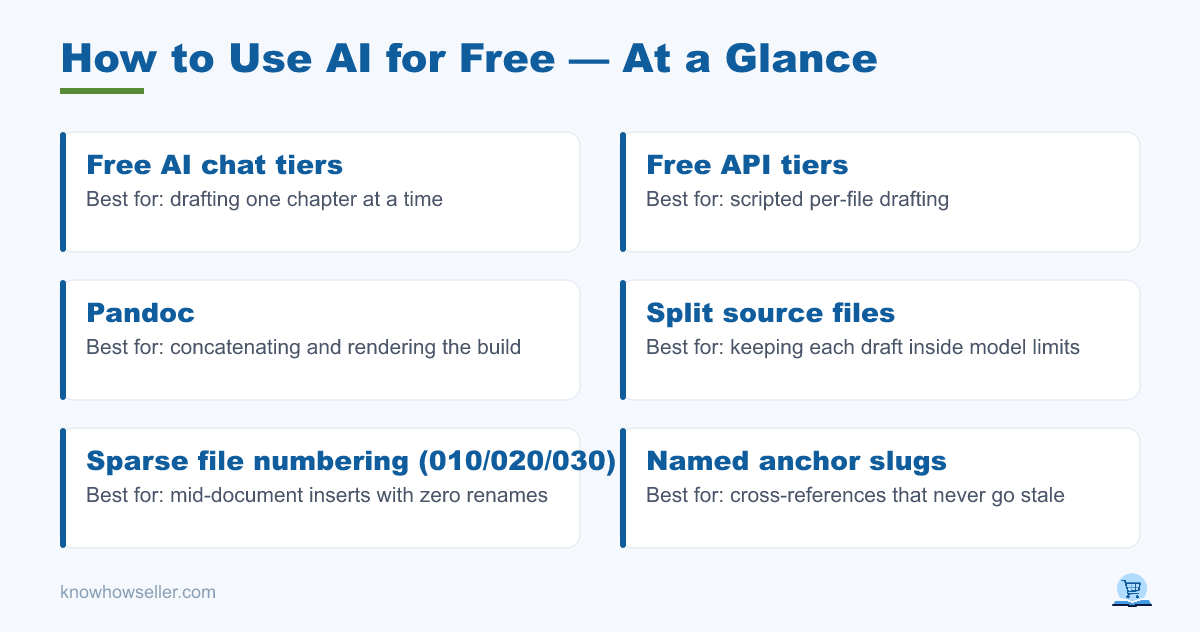
You split the manuscript into many small source files, draft each one separately in a free AI chat or free API tier, and run a build script that concatenates and renders them. Free models handle one chapter comfortably; none of them reliably hold a whole book. The build, not the model, keeps the book coherent.
The target this method is built for is a book-length technical manuscript drafted and assembled in a single working day, then revised over several passes. Nothing about it requires a paid seat: the drafting runs on free-tier chat access, and the assembly runs on Pandoc, which is free and open source.
Scale check before you plan: OpenAI’s published tokenizer guidance puts English at roughly four characters per token, so a 100,000-character English manuscript is on the order of 25,000 tokens. CJK text tokenizes far denser, so the same character count can cost several times more — check your provider’s tokenizer instead of assuming.
Why is a long context window not the answer?
Because capacity is not comprehension. Vendors document very large context windows — 200K tokens as the standard figure on Claude models, with million-token options on some, and comparable or larger figures on Google’s Gemini models — so a book technically fits. Check the current model card rather than a number in an article, and note that free tiers do not always expose the largest window. Even where it fits, retrieval quality across that span is uneven, and every regeneration reprocesses the whole thing. Small files sidestep both problems.
The research backs this up. Liu et al., Lost in the Middle: How Language Models Use Long Contexts (Transactions of the ACL, 2024; preprint 2023), found model performance is highest when the relevant information sits at the very beginning or very end of the input, and degrades noticeably when it is buried in the middle. A 30-chapter manuscript in one context window is almost entirely middle.
Why was writing never the bottleneck?
Because drafting is parallel and cheap, while structure is serial and expensive. In practice, draft sections arrive faster than you can place them. The real hazard shows up when a section is inserted mid-document: every downstream cross-reference — “see section 4.2”, figure numbers, table numbers — silently goes stale.
Silently is the key word. A wrong cross-reference does not throw an error. It builds cleanly, exports cleanly, and only a reader finds it. Across several revision passes in one day, that is the single defect class that can quietly spoil every output at once.
What numbering scheme survives a mid-document insert?
Sparse file numbers plus named anchors. Source files are numbered 010, 020, 030 so an inserted section lands at 015 with zero renames. Inside the prose, cross-references point at stable slugs such as sec-build-step, never at a literal number, and the build resolves each slug to whatever number the section ends up with.
This is the scheme to adopt before the first revision pass, and it is the whole reason later passes stay cheap. Three rules make it work:
- Sparse, not sequential. Gaps of ten between file numbers mean an insert is a new file, not a rename cascade.
- Chapter-relative numbers. Numbering as 3.1, 3.2 rather than a single running count caps the blast radius of any insert to one chapter.
- Symbolic references only. If a human typed the number, it will rot. Let the build compute it. Pandoc’s
pandoc-crossreffilter does this for Markdown; Word cross-reference fields and LaTeX\label/\refdo the equivalent natively.
How does split-file drafting compare with one big document?
Split files win on every axis that matters for a one-day build, and the gap widens with each revision pass. The comparison below is based on how these tools documentably behave, not on a scored benchmark. The single-file approach only looks simpler until the first mid-document insert, at which point the cost of a change becomes proportional to document length rather than to the size of the change.
| Dimension | One big file | Split files, manual assembly | Split files + auto build |
|---|---|---|---|
| Fits a free-tier context | No, past a few chapters | Yes, per file | Yes, per file |
| Cost of a mid-document insert | Re-check every later reference by hand | Rename cascade across files | New file at a gap number; references resolve themselves |
| Cost of a second edition | Full re-read | Re-assemble manually | One command |
| Regenerating one section | Risks rewriting neighbours | Safe | Safe |
| Where errors hide | Stale numbers, silently | Wrong file order | Build log surfaces unresolved anchors |
Which free tools cover the whole pipeline?
Three categories: a free AI tier for drafting, a plain-text editor, and a free converter for the build. None of this needs a subscription. Free AI rate limits change constantly, so treat any published number as perishable and check the vendor’s own limits page before you plan a heavy day.
| Job | Free option | What to watch |
|---|---|---|
| Drafting sections | Free chat tiers (Claude, ChatGPT, Gemini); Google AI Studio for free API access | Per-day and per-minute caps; verify current limits and eligibility in vendor docs |
| Editing source | VS Code, or any plain-text editor | Save as UTF-8, always |
| Build and export | Pandoc (free, open source) to DOCX, EPUB, PDF | Multiple input files are concatenated in the order you pass them; PDF output needs a separate engine installed |
| Cross-references | pandoc-crossref filter, or native Word/LaTeX reference fields | Unresolved anchors should fail loudly, not silently |
| Version history | Git | Small files make diffs readable; one huge file makes them useless |
What does the automatic build step actually do?
It turns a folder of fragments into a finished book with one command: collect source files in numeric order, resolve every cross-reference anchor to a real number, render to the output formats you need, and report anything it could not resolve. That last part is the safety net that catches stale references.
Keep the source tree text-only. We learned this the hard way in a different system — a note vault where full-vault search kept hanging on large non-markdown files. Moving the binary files out to a sibling folder shrank the vault by an order of magnitude and the hangs stopped. A manuscript folder behaves the same way: keep images in a sibling directory and reference them by path.
What Windows-specific traps should you expect?
Two, repeatedly: non-ASCII paths and PowerShell encoding. Non-ASCII folder names in build scripts and PowerShell’s default output encoding are recurring failure sources in our own automation — far more so than anything the model does. Both produce garbled text or file-not-found errors that look like AI failures but are pure plumbing.
- Force UTF-8 explicitly on every write. PowerShell 5.1 will not do it for you.
- Quote every path, and prefer forward slashes when passing paths to cross-platform tools.
- Keep any watchdog or monitoring process outside the system it watches — a monitor that dies with its target reports nothing rather than reporting failure.
One honest caveat about who is writing this: the author is not a developer and cannot read code. Every one of those failures was diagnosed by pasting the error message straight back into the AI and asking what it meant. That is a viable workflow, and it is worth saying out loud, because “you need to be technical for this” is the most common reason people never try it.
Should you have AI review every edit as you go?
No. In our own workflow, running an AI second-opinion review on every code edit produced a churn loop: the reviewer critiqued unfinished work, and the author reflexively rewrote it, which produced more unfinished work to critique. Moving the review to once per session end ended the cycle.
The same discipline applies to prose. Draft the whole chapter, then review. Reviewing mid-paragraph invites the model to relitigate decisions you have not finished making.
Where does this method genuinely fall short?
It gets you a structurally sound manuscript in a day, not a verified one. AI drafts confidently through gaps in its knowledge, so every technical claim, command, and version number still needs human checking. The build guarantees the numbers line up. It guarantees nothing about whether the content is true.
Free tiers also throttle. A one-day build on free access means working around rate limits, which is another argument for small files: a rejected request costs you one section, not the book.
Knowhow Seller writes about AI tools based on hands-on use, side-by-side comparison, and published documentation — not vendor marketing.