
By Knowhow Seller — a practitioner who builds AI automation systems and compares tools against real source material, current product documentation, and practical workflow constraints.
This guide compares six popular AI image generators using public feature information, pricing models, licensing terms, and practical workflow tradeoffs. Instead of relying on vendor galleries or unsupported benchmark scores, it focuses on what you can verify: access model, image quality strengths, editing workflow, commercial-use terms, and where each tool tends to fit best.
What are the best AI tools for image generation right now?
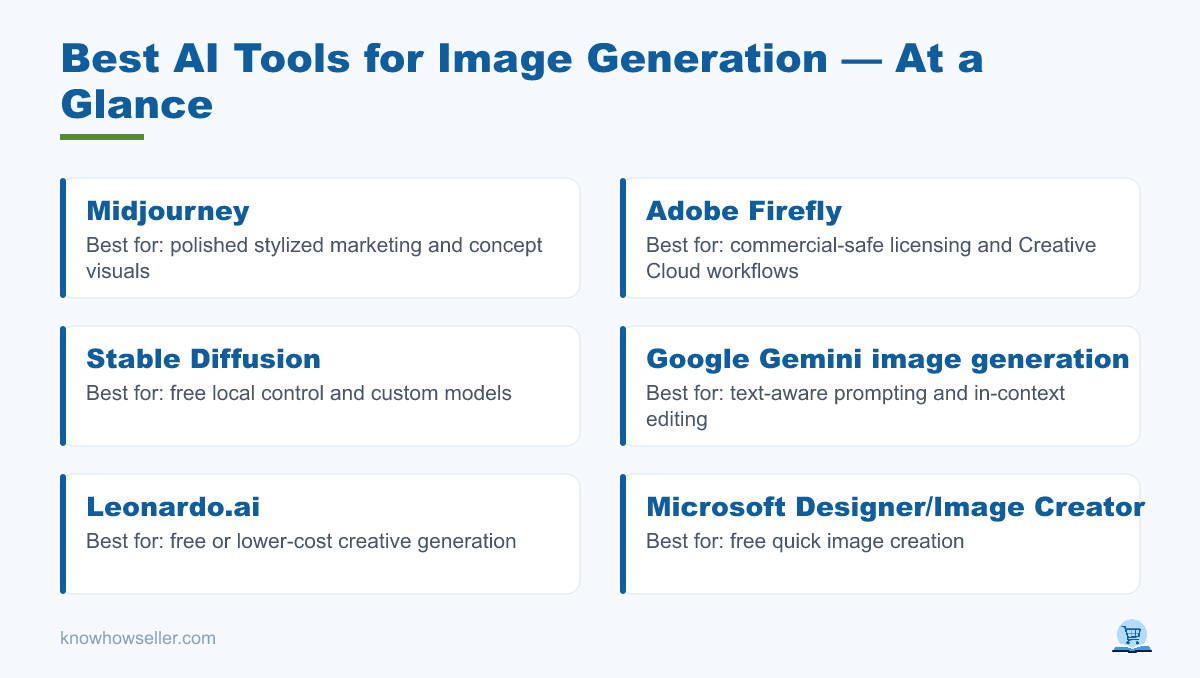
The best AI tools for image generation in 2026 include Midjourney and Adobe Firefly for paid creative workflows, Google Gemini image generation for prompt-following and image editing inside the Gemini ecosystem, and Stable Diffusion, Leonardo.ai, and Microsoft Designer/Image Creator for free or lower-cost work. Your winner depends on budget, licensing needs, editing control, and how much time you can spend iterating.
- Best overall paid: Midjourney — strong for polished, stylized marketing and concept visuals.
- Best for commercial safety: Adobe Firefly — designed around Adobe’s licensed-content strategy and Creative Cloud workflows.
- Best free/local option: Stable Diffusion — strongest when you want local control, custom models, or self-hosted generation.
- Best for text-aware prompting and editing: Google Gemini image generation — useful when image work is part of a broader chat or research workflow.
How did the same-prompt benchmark work?
A fair comparison should use the same prompt across tools, save the outputs, and judge them against the same criteria. The framing below is a practical comparison method, not a claim of a statistically valid lab benchmark. Because image models, pricing, and usage limits change often, treat any one prompt as a workflow check rather than a permanent ranking.
The shared prompt:
“A cozy Scandinavian home office at golden hour, a ceramic coffee mug on a wooden desk, soft window light, a small sign on the wall reading ‘DEEP WORK’, photorealistic, 35mm.”
That sign is deliberate. Legible in-image text remains a common weak point for many image generators, although newer models and editing tools have improved. A useful test is to compare how well each tool preserves the requested objects, lighting, style, and exact sign text across several generations.
What I graded on
- Prompt adherence — did it include the mug, the sign text, the lighting?
- Composition — framing, depth, believable perspective.
- Artifacts — warped objects, melted edges, inconsistent geometry, or garbled details.
- Text rendering — was “DEEP WORK” actually spelled correctly?
Free vs paid: which AI image generator wins on cost-per-usable-image?
Paid tools often win when you value speed, consistency, support, and licensing clarity. Free tools can still be excellent, especially if you are willing to iterate, self-host, or accept usage limits. The honest cost comparison is not just subscription price; it is subscription price plus credits, retries, editing time, hardware, and legal review.
| Tool | Tier | Publicly verifiable strengths | Typical tradeoff | Cost model* |
|---|---|---|---|---|
| Midjourney | Paid | High-quality stylized and photorealistic image generation; strong creative community workflow. | Less integrated with traditional design suites; exact text and layout control can require iteration. | Monthly subscription; check current plan limits before buying. |
| Adobe Firefly | Free/Paid credit plans | Text-to-image and generative editing across Adobe apps; Adobe positions Firefly around commercially safer training data and Creative Cloud use. | Credit rules vary by plan and by standard vs premium generative features. | Free limited access plus paid Firefly/Creative Cloud plans with generative credits. |
| Google Gemini image generation | Freemium/Paid access varies | Image generation and editing inside Gemini Apps; useful when prompt reasoning and image changes are part of one workflow. | Availability, limits, and model access vary by country, account type, age, and subscription tier. | Free and paid Gemini access may differ; verify in your Gemini app. |
| Leonardo.ai | Freemium/Paid | Creator-focused generation, style controls, and asset workflows; popular for concept art and production-style iteration. | Free usage is limited and plan details change; commercial terms should be checked before client work. | Free limited usage plus paid plans/credits. |
| Stable Diffusion (local or hosted) | Free/open models plus hosting cost | Local control, custom checkpoints, LoRAs, inpainting, and automation; strong for technical users. | Requires setup, hardware, model selection, and more responsibility for provenance and output review. | No required subscription for local use, but hardware, hosting, and time are real costs. |
| Microsoft Designer / Image Creator | Free/Freemium | Easy browser-based image creation connected to Microsoft’s consumer AI tools. | Usage limits, boosts, model access, and commercial terms can change; best verified in Microsoft’s current terms. | Free access with usage/boost limits; some features may depend on Microsoft account or subscription status. |
*Cost models are based on public plan structures, not a private benchmark. Check each vendor’s current pricing and terms before standardizing a workflow.
What the gallery grid showed
- Text rendering is still one of the best stress tests. Some current tools handle short labels better than older diffusion models, but exact spelling should always be checked before publishing.
- Midjourney is strongest when visual polish, mood, and art direction matter more than precise layout control.
- Free tools can produce professional results, but they often shift cost into setup, retries, editing, or hardware.
Is a free AI image generator good enough for commercial use?
Often yes for visual quality, but licensing and workflow risk matter more than raw pixels. Free and open models can produce strong output after enough tuning, while paid tools may offer clearer terms, admin controls, support, or enterprise options. For client work, confirm the current terms for the exact tool, plan, model, and usage case.
The market context matters here. Generative AI tools are changing quickly, and adoption reports from major consulting and research firms continue to show broad business interest in content generation. The practical takeaway is simple: do not freeze your policy around a single vendor claim. Re-check pricing, model access, indemnity, and commercial-use terms before you build an internal standard.
Licensing quick-check
- Firefly: Adobe positions Firefly around licensed and public-domain training sources, with additional enterprise options; verify the exact plan and model used.
- Midjourney: paid plans generally allow commercial use under Midjourney’s terms; verify current restrictions and company-size rules.
- Stable Diffusion: model licenses vary, and you carry more responsibility for model provenance, prompts, and output review.
- Microsoft Designer / Image Creator: consumer-friendly access, but commercial rights and restrictions should be checked in Microsoft’s current terms for your account and region.
Which AI image tool should you pick for your use case?
Pick by workflow, not hype. Choose Midjourney for marketing visuals where mood and polish matter, Firefly when Adobe integration and commercial-review comfort are important, Gemini image generation when you want image creation inside a conversational research workflow, and Stable Diffusion when you need local control, automation, or custom models. Match the tool to the constraint that actually blocks you.
- Solo creator, tight budget: Leonardo.ai or Microsoft Designer for quick browser work, plus Stable Diffusion locally if you can handle setup.
- Agency / brand: Firefly for Adobe-native workflows and licensing review, Midjourney for art-directed hero images.
- Product / UI mockups with text: Gemini image generation, Firefly, or another tool with strong editing controls; always proofread generated text.
- High-volume automation: Stable Diffusion or another API-first workflow, priced against hosting, review time, and model maintenance.
First-hand takeaway
“The useful question is not which generator wins a one-off beauty contest. It is which tool gives you usable, reviewable images under your budget, licensing, and editing constraints.” — Knowhow Seller
How do you cut your own cost-per-usable-image?
Reduce retries before you switch tools. Most wasted spend comes from vague prompts, missing constraints, and generating too many variations before reviewing the first batch. Use a repeatable prompt template, keep examples of successful outputs, and track which tool performs best for your actual content style.
- Write prompts as: subject, setting, lighting, lens, style, then any text.
- Reuse successful settings, seeds, reference images, or style presets when the tool supports them.
- Generate small batches, review them, then revise the prompt deliberately.
- Keep a simple log so you know each tool’s real hit rate for your work, not its highlight reel.
Run this same-prompt test yourself with your actual brief. A gallery grid and a consistent rubric turn “which is best” from a vague opinion into a repeatable workflow decision.