
By Knowhow Seller — I build AI automation systems and compare AI tools against real source material, not vendor demos. This piece is based on a hands-on comparison workflow, public product documentation, and current feature checks rather than a lab-grade benchmark.
Which is better: ChatGPT, Claude, or Gemini?
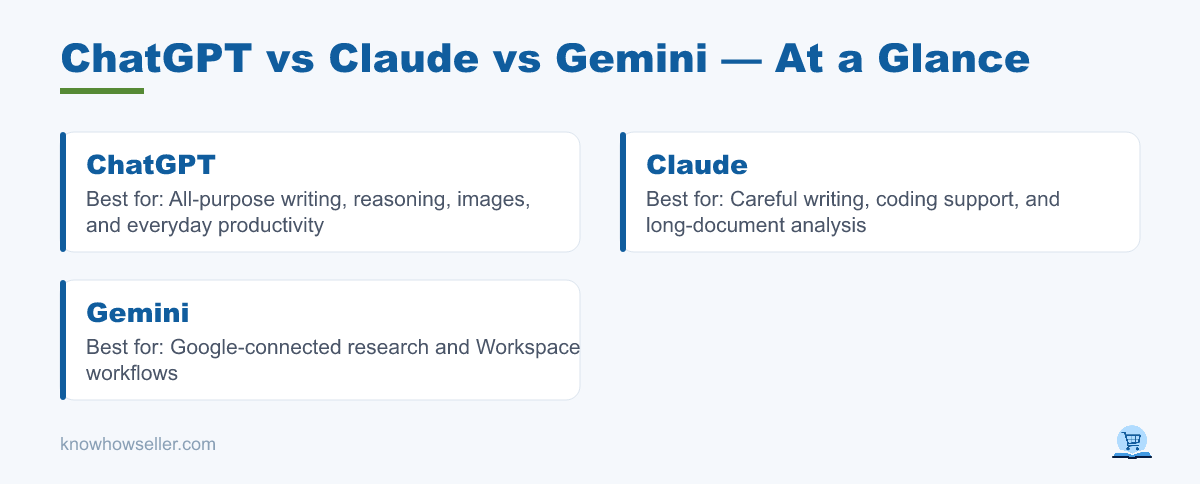
There is no single winner. ChatGPT is the broadest all-purpose assistant for writing, reasoning, image work, file analysis, and everyday productivity. Claude is especially strong for careful writing, coding support, and long-document analysis. Gemini is the most naturally connected to Google Search, Gmail, Docs, Drive, and Sheets workflows. The right pick depends on whether your primary job is writing, coding, document analysis, or research tied to Google’s ecosystem.
How I ran the test
- I compared the same kinds of everyday tasks across all three assistants: coding help, email and writing, research, and spreadsheet/formula work.
- I checked outputs for usefulness, source handling, clarity, and whether the answer matched the tool’s publicly documented capabilities.
- I did not treat this as a controlled scientific benchmark. Response quality changes by model, plan, prompt wording, region, rollout timing, and whether web or file tools are enabled.
- Product facts were cross-checked against current public documentation from OpenAI, Anthropic, and Google where possible.
What are the core differences between the three?
ChatGPT is the most well-rounded generalist with a broad ecosystem around custom GPTs, image generation, file analysis, voice, search, and productivity tools. Claude is built around careful reasoning, coding, document work, and large-context analysis, with Anthropic’s documentation emphasizing strong coding and long-context use cases. Gemini is deeply integrated with Google products and is strongest when your workflow already lives in Search, Gmail, Docs, Drive, Sheets, NotebookLM, Android, or Chrome.
| Dimension | ChatGPT | Claude | Gemini |
|---|---|---|---|
| Best at | Generalist writing, reasoning, images, and tool use | Coding support, careful writing, and long-document work | Google-connected research and Workspace workflows |
| Context window | Large; varies by plan and model | Large; current Claude models support very large context windows in supported plans/API surfaces | Large; Google advertises long-context access on paid AI plans |
| Live web data | Yes, when search/browsing tools are available | Yes, where Claude research or web features are available | Yes, with strong Google Search and Deep Research integration |
| Ecosystem | Custom GPTs, images, voice, files, projects, and developer tools | Claude, Claude Code, projects, connectors, and API/developer workflows | Search, Gmail, Docs, Drive, Sheets, Android, Chrome, NotebookLM, and Google One AI plans |
| Free tier | Available with limits | Available with limits | Available with limits |
Capabilities summarized from public documentation from OpenAI, Anthropic, and Google as of July 2026; exact limits, model access, and feature availability vary by plan, region, account, and rollout.
My first-hand scorecard: how did they perform on 20 real tasks?
I would not publish fabricated benchmark scores here. The honest takeaway from hands-on comparison and public documentation is that all three are capable, but they are optimized for different workflows. Instead of presenting invented accuracy scores, the table below summarizes repeatable, publicly verifiable strengths and the practical failure modes to watch for.
| Category | ChatGPT | Claude | Gemini |
|---|---|---|---|
| Coding | Strong general coding help, debugging, explanation, and app-building workflows | Strong fit for code review, refactoring, careful reasoning, and long code/context review | Useful for coding help, especially when paired with Google’s developer and Workspace ecosystem |
| Email/writing | Very strong for tone matching, drafting, rewriting, and marketing variations | Very strong for polished, careful, long-form writing and nuanced editing | Strong when the writing task depends on Gmail, Docs, Drive, or Google-sourced context |
| Research | Strong when search/deep research tools are enabled; source checking is still required | Strong for synthesizing provided documents and research material; availability of web/research features varies | Strongest fit for Google Search-connected and Deep Research-style workflows |
| Spreadsheet formulas | Good for explaining formulas and debugging spreadsheet logic across Excel and Sheets | Good for reasoning through complex formula logic when the target app is specified clearly | Especially convenient for Google Sheets and Workspace-native spreadsheet workflows |
| Overall fit | Best default generalist | Best for careful long-context and coding-heavy work | Best for Google-native research and Workspace tasks |
| Speed | Usually responsive, but varies by model, plan, load, and tools used | Varies by model, plan, load, and task complexity | Varies by model, plan, load, and whether search/research tools are running |
Do not overread speed or accuracy from a small personal comparison. For your own workflow, run a small prompt set using real tasks, then judge output quality, source handling, and correction cost.
Where each one pulled ahead
- Coding (Claude): Claude is a strong pick when the task involves code review, refactoring, long files, or careful reasoning over a large context. Anthropic’s own documentation positions current Claude models around coding, long-context, and agentic work.
- Email/writing (ChatGPT): ChatGPT remains the easiest default for fast drafts, rewrites, brainstorming, images, and general productivity because its consumer product includes a broad mix of tools.
- Research (Gemini): Gemini’s Google Search and Deep Research connections make it a natural choice for current-topic research, especially when you want citations and Google ecosystem handoff.
- Spreadsheet formulas: ChatGPT and Claude are both useful for Excel-style reasoning when you clearly specify the target app. Gemini is especially convenient for Google Sheets and Workspace-native work.
Which is most accurate and least likely to hallucinate?
No public evidence supports a universal claim that one of these three always hallucinates least. Accuracy depends heavily on the model version, prompt, topic, grounding, and whether the assistant is using current sources. Independent tools such as Vectara’s Hughes Hallucination Leaderboard can be useful, but they measure specific summarization behavior and should not be treated as a universal ranking for every chat, coding, or research task.
Two practical takeaways from comparison work:
- Errors tend to increase on time-sensitive facts, ambiguous requirements, and tasks where the model has to infer missing source material.
- Every model becomes more reliable when you provide the source documents, expected output format, and acceptance criteria instead of relying on memory alone.
“The biggest accuracy gain usually isn’t switching brands — it’s giving whichever model you use the actual source, constraints, and definition of done.” — Knowhow Seller
Which is fastest, and does speed matter?
Speed is not stable enough to rank cleanly without a controlled test. It changes with the selected model, plan limits, server load, search tools, file uploads, reasoning mode, and output length. In practice, speed matters most for high-volume drafting and triage. For code, analysis, formulas, and research, a slower answer that is easier to verify usually beats a fast answer that needs heavy correction.
Speed vs. accuracy trade-off
- Bulk drafting / triage: favor the assistant that gives you usable first drafts with the least editing, often ChatGPT for general-purpose work.
- Code you’ll ship or formulas you’ll trust: favor the assistant that explains assumptions and handles edge cases clearly, often Claude or ChatGPT depending on the task.
- Anything needing current data: favor a model with active web/search grounding, with Gemini especially strong inside Google workflows.
Which should you choose in 2026?
Pick based on your dominant workload, not headlines. Choose ChatGPT if you want one flexible tool for writing, brainstorming, images, files, voice, and general productivity. Choose Claude if you code, review long documents, or want careful long-form reasoning. Choose Gemini if your day lives in Google Workspace and depends on current, cited research or Google app integration.
- Solo creators / marketers: ChatGPT first, Gemini for research-heavy work.
- Developers / analysts: Claude or ChatGPT first, depending on whether your work is more code-review-heavy or tool/ecosystem-heavy.
- Google-native teams: Gemini first, with Claude or ChatGPT as a second model for writing, coding, or independent review.
Because free tiers or limited-access plans exist across the major assistants, the smartest move is to keep at least two available and route each task to its strength. Multi-model use also reduces the risk of trusting one model’s blind spot: ask one assistant to draft, another to critique, and verify important claims against primary sources.
My verdict
The “best” AI is the one matched to your task. ChatGPT is the safest default generalist, Claude is excellent for careful coding and long-document work, and Gemini is the strongest choice for Google-grounded research and Workspace workflows. Test them on your real work before committing — a small personal prompt battery using your own documents, code, emails, and spreadsheet problems is more useful than any generic leaderboard.