
By Knowhow Seller. Knowhow Seller compares AI tools through hands-on use, product research, and vendor documentation. Every review here is grounded in real use and comparison, not vendor marketing. For this piece, we focused on the question most roundups skip: which free tiers are genuinely useful after the first session, and which ones are mainly demos, trials, or tightly metered samplers?
Which free AI tools actually stay free?
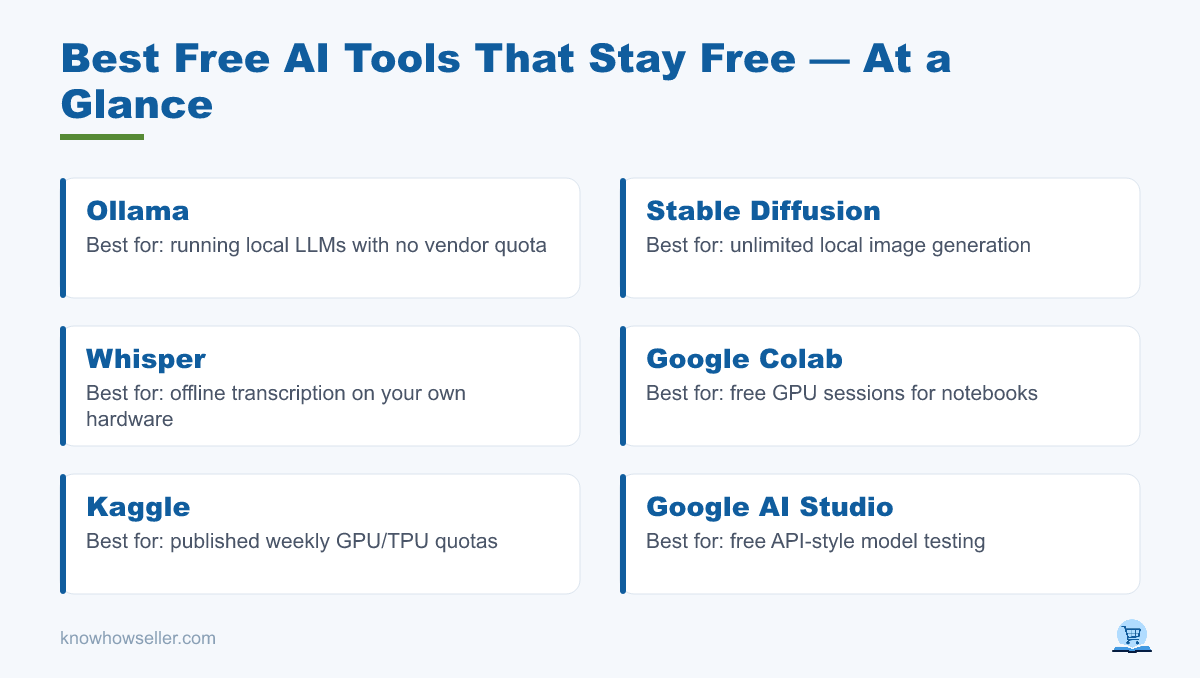
The free AI tools that stay free are the ones with no vendor credit meter: local models (Ollama, Stable Diffusion, Whisper), free compute with published or dynamic quotas (Kaggle, Google Colab), and product tiers that remain usable without payment (Canva Free, GitHub Copilot Free, Google AI Studio). Chat assistants stay free too, but they usually enforce rate limits, feature limits, or model access limits instead of giving unlimited access to the best model all day.
Everything else needs closer reading. Two patterns to watch for:
- One-time or limited credits that make the tool useful for sampling but not dependable for ongoing work.
- Renewing credits with plan, export, privacy, or commercial-use restrictions. You may be able to generate, but the rights, privacy, speed, or usable output may depend on upgrading.
How did we test the real limits of each free tier?
We used the tools directly where practical and compared what we found with public pricing pages, help-center articles, terms, and privacy documentation available around 15 August 2026. We did not run a controlled lab benchmark across all tools, and we do not present invented scores or exact block counts as if they came from a repeatable test.
Method notes, so you can judge the limits:
- Vendor-published limits first. If a tool publishes a specific free allowance, we use that instead of guessing.
- Real-use framing. If a tool does not publish a number, we describe the practical constraint: rate limits, cooldowns, model downgrades, queues, or unavailable features.
- Hard limits versus soft degradation. A blocked button, exhausted quota, or unavailable feature is different from a slower queue or smaller-model fallback.
- Rights and training answers are summarized from vendor terms, pricing, privacy, or help pages where available. These can change, so check the current page before client or company work.
“The published limit tells you what the vendor is willing to promise. The limit you actually hit depends on demand, model cost, account type, and settings. On free tiers, the useful question is not just ‘is it free?’ but ‘what happens when I use it for real work?'” — Knowhow Seller
What are the real daily limits on 20 free AI tools?
Below is the practical comparison: published free limit versus the limit you are most likely to notice in normal use. Chat assistants rarely publish exact message numbers, so their column uses vendor language. Local tools have no vendor-side limit beyond your hardware, which is exactly why they belong in a free-tools list.
| Tool | Use | Published free limit | Practical free-tier ceiling | Watermark | Commercial use | Trains on your data by default |
|---|---|---|---|---|---|---|
| ChatGPT Free | Chat | Limited access to flagship-model and tool features within a reset window; exact limits vary | When the limit is reached, access to certain models, GPTs, uploads, analysis, or image features may pause until reset or upgrade | No | Generally yes, subject to terms and policy | May be used for improvement unless you turn off model-improvement controls |
| Claude Free | Chat | Usage limits reset on a rolling session window; exact message count depends on length, tools, model, and context | Long files, Research, connectors, and complex chats consume the allowance faster than short prompts | No | Generally yes, subject to terms and policy | No for standard consumer chats unless you opt in, provide feedback, or a safety-review exception applies |
| Google Gemini (app) | Chat | Free access with model and feature limits that vary by product and region | Advanced features such as deep research, file handling, or image generation may be more constrained than plain chat | No visible mark on chat; Google uses provenance technologies such as SynthID on some AI media | Generally yes, subject to terms and output risk | Yes when Gemini Apps Activity is on; can be turned off for future chats |
| Microsoft Copilot Free | Chat | Free chat with limits on some advanced features, image features, and priority access | Image generation and high-demand features may slow, queue, or become temporarily limited | No standard visible watermark | Generally yes, subject to Microsoft terms and third-party rights | Conversation activity may be used for model improvement unless opted out where controls are available |
| Perplexity Free | Search | Practically unlimited basic searches with a very limited amount of Pro Searches | Basic search remains useful; advanced models, image generation, richer file use, and deeper Pro features require a paid plan | No | Generally yes for your use of outputs, subject to source rights | May use data depending on account and privacy settings; review Perplexity settings before sensitive work |
| Google AI Studio | API/dev | Free-tier access to eligible Gemini models with per-model rate limits | Batch jobs and app prototypes can hit requests-per-minute or tokens-per-minute limits before daily limits | No | Generally yes, subject to Gemini API terms | Yes on unpaid services; prompts and responses may be used to improve Google products and reviewed by humans |
| GitHub Copilot Free | Coding | 2,000 code completions and 50 chat requests per month | Useful for light coding; chat and edit requests are the tighter allowance for active work | No | Generally yes, subject to GitHub terms and code-license risk | Depends on product settings and organization policy; review Copilot data settings |
| Cursor Free | Coding | Hobby plan with limited Agent requests and limited Tab completions | Enough to try the editor; agent-heavy refactors quickly push users toward paid plans | No | Generally yes, subject to terms and code-license risk | Privacy Mode can be enabled; when enabled, Cursor says code data is not used for training by Cursor or model providers |
| Google Colab Free | GPU compute | Dynamic usage limits; no guaranteed GPU availability | Sessions can disconnect, GPUs may be unavailable, and cooldowns depend on demand and prior use | N/A | Yes, subject to your code, data, and model licenses | No model-training issue by default; you control what code and data you run |
| Kaggle Notebooks | GPU compute | GPU quota is commonly listed as 30 hours per week or sometimes higher depending on demand and resources | One of the clearest free compute quotas; still subject to platform rules and resource availability | N/A | Yes, subject to your code, data, and model licenses | No model-training issue by default; you control what code and data you run |
| Hugging Face Spaces | Model demos | Free CPU Spaces; GPU availability and limits depend on owner, hardware, and billing setup | Great for trying demos; heavy public demos can sleep, queue, or require paid hardware | Depends on the Space | Depends on model and Space license | Depends on the Space implementation; do not submit confidential data to unknown public demos |
| Ollama + local LLM | Chat/dev | None from vendor once installed locally | Limited by RAM, VRAM, disk, model size, and speed of your machine | No | Depends on the model license | No, if run fully local |
| Canva Free | Design | Free design tools with fair-use limits on Magic Write and other AI features | Reliable for non-AI design; AI features are useful but metered and higher limits sit behind paid plans | Only on some premium assets or features | Yes for eligible free assets and your own designs, subject to Canva content licenses | Canva provides AI data controls and opt-out paths; check account settings for current controls |
| Leonardo.ai Free | Images | 150 daily tokens for free users | Image count varies because token cost changes by model, size, references, post-processing, and video use | No standard visible watermark | Yes under a non-exclusive license, but free generations are public and Leonardo retains broad rights | Free-tier content is public by default; private generation is a paid-plan feature |
| Adobe Firefly Free | Images | Limited free daily generations across supported generative AI features; features and models can change | Good for trials and occasional use; higher volume and premium capabilities require a paid Adobe plan | Content Credentials attached | Yes for eligible non-beta Firefly outputs; beta or partner-model features may have extra limits | Adobe states Firefly models are trained on licensed and public-domain content; review current Adobe privacy terms for account data |
| ComfyUI + Stable Diffusion (local) | Images | None from vendor once installed locally | Limited by GPU/CPU, storage, model size, workflow complexity, and patience | No | Depends on the model license and training-data risk in your jurisdiction | No, if run fully local |
| ElevenLabs Free | Voice | Free plan includes a monthly credit pool | Useful for samples and short drafts; sustained voiceover work requires paid credits | Attribution required when publishing free-plan output | No commercial license on the free plan | Review ElevenLabs privacy and data-use settings before confidential work |
| Suno Free | Music | 50 credits renew daily, enough for about 10 songs per day under Suno’s own guidance | Daily creative sampler; paid plans unlock commercial rights, higher monthly credits, and advanced features | No standard audio watermark | No, free-plan songs are for personal, non-commercial use | Review Suno terms and privacy settings; public sharing can expose outputs |
| Whisper (local) | Transcription | None from vendor once installed locally | Limited by processing speed, file size, hardware, and chosen implementation | No | Yes for Whisper itself under its open-source license, subject to your audio rights | No, if run fully local |
| Gamma Free | Decks | Free plan with limited AI creation credits and plan restrictions | Useful for testing deck generation; ongoing deck production and polished exports are paid-plan territory | May apply on free/shared output depending on plan | Check Gamma’s current terms and export restrictions before client use | Review Gamma privacy terms before uploading confidential company material |
Important caveat: free tiers are the fastest-moving part of any AI product. Treat this as a snapshot and a decision method, not a permanent spec sheet. Vendors can change limits, models, credits, privacy settings, and rights language without making old roundups true again.
Which free AI tools blocked us soonest?
Voice, music, image, and deck tools usually feel tightest because each output costs real compute and often involves export or rights controls. Coding chat can run out quickly because agent and chat requests consume a small monthly pool. Text chat and search often degrade or limit advanced features rather than blocking all usage. Local tools do not block at all, because there is no hosted credit meter.
- Most likely to feel constrained in one session: ElevenLabs, Adobe Firefly, Gamma, Leonardo.ai, Perplexity Pro Searches.
- Most likely to run out during active work: GitHub Copilot chat requests, Cursor Agent requests, Canva AI writing features.
- Refills or quotas make them predictable: Suno daily credits, Leonardo daily tokens, Kaggle weekly GPU quota, Google AI Studio rate limits.
- No vendor-side block once installed: Ollama, local Stable Diffusion or ComfyUI, and local Whisper.
Can you use free AI tool output commercially?
Most text and code tools give broad rights to use outputs, but that does not erase copyright, trademark, publicity, confidentiality, or license risks in the inputs and generated material. Media tools are more mixed. Suno Free and ElevenLabs Free restrict commercial use. Adobe Firefly generally allows commercial use for eligible non-beta Firefly outputs. Leonardo.ai allows free-tier commercial use through a non-exclusive license, but free creations are public and not exclusive to you.
Two traps worth naming:
- Free-tier visibility. Some image and music tools make free-account generations public or link-visible. Fine for practice, wrong for confidential client work.
- Model licence versus service terms. A locally run model can be free to use but still carry a licence that restricts certain commercial applications. Read the model card, not just the app page.
Do free AI tools train on your data?
Assume consumer free tiers may use your data for improvement unless the vendor says otherwise and you can verify the setting. ChatGPT provides a model-improvement control. Claude says standard consumer chats are not used for training unless you opt in or trigger specific exceptions. Gemini Apps can use activity for improvement when activity is on, and Google AI Studio unpaid services may use prompts and responses to improve Google products. Local tools never send anything anywhere if you run them fully offline.
If you handle client or company material, the practical rule is simple: run sensitive work locally, use an enterprise or paid plan with clear data protections, or verify that training is off before you paste the material.
How many people rely on free AI tools?
Enough that free tiers are now a mainstream product decision, not a marketing extra. Reliable trackers to check rather than trusting any single vendor claim: Stack Overflow’s annual Developer Survey, Pew Research Center’s surveys on US chatbot use, and the Reuters Institute Digital News Report on general-public generative AI use.
- Stack Overflow’s Developer Survey has consistently found broad developer interest in AI tools, with usage and attitudes changing year over year.
- Pew Research Center surveys have shown that many US adults are aware of AI chatbots, while regular use remains lower than awareness.
- The Reuters Institute Digital News Report tracks generative AI use across countries and is useful for understanding public adoption beyond vendor user-count claims.
We cite these because they publish methodology and sample sizes. Vendor-published user counts can be useful context, but they should not be the basis of a tool decision by themselves.
Which free AI tool should you choose for your job?
Pick by the shape of your workload, not by feature lists. Heavy daily use needs a tool with no meter or a quota you can plan around. Occasional bursts are fine on daily credits. One-time or small free allowances suit experiments and prototypes, not recurring client production. Match your usage rhythm to the refill rhythm and the free tier becomes much less frustrating.
- Daily writing and research: a free chat assistant plus free search. Expect model, upload, research, or advanced-feature limits.
- Daily coding: GitHub Copilot Free for light completions and chat, plus a local model when monthly chat or agent limits become tight.
- High-volume images: local Stable Diffusion or ComfyUI, assuming your hardware and chosen model license fit the job.
- Transcription: local Whisper. It is unlimited, private, and dependable once installed.
- One-off deck, voiceover, or song draft: use free credits deliberately, finish the draft quickly, and check commercial rights before publishing or selling.
What is the honest takeaway?
The genuinely durable free tools are the ones that either run locally or publish a quota you can plan around: Ollama, local Stable Diffusion or ComfyUI, Whisper, Kaggle, Colab within its dynamic limits, and Canva Free for ordinary design work. The rest can still be useful, but treat their free tier as a metered resource because the vendor already does.
The most useful habit: before committing a workflow to any free tool, spend a small test session finding the actual constraint. Is it messages, credits, export, queue speed, privacy, commercial rights, or model access? Knowing that on day one is better than discovering it at deadline.