
Every “best free AI tools” list looks the same: 40 logos, no hands-on use, no mention of the moment the free tier stops working. So we did the boring version instead — a fixed set of five everyday tasks, 22 free accounts, and the published terms for each plan read line by line, with a note every time we hit a wall.
What are the best free AI tools in 2026?
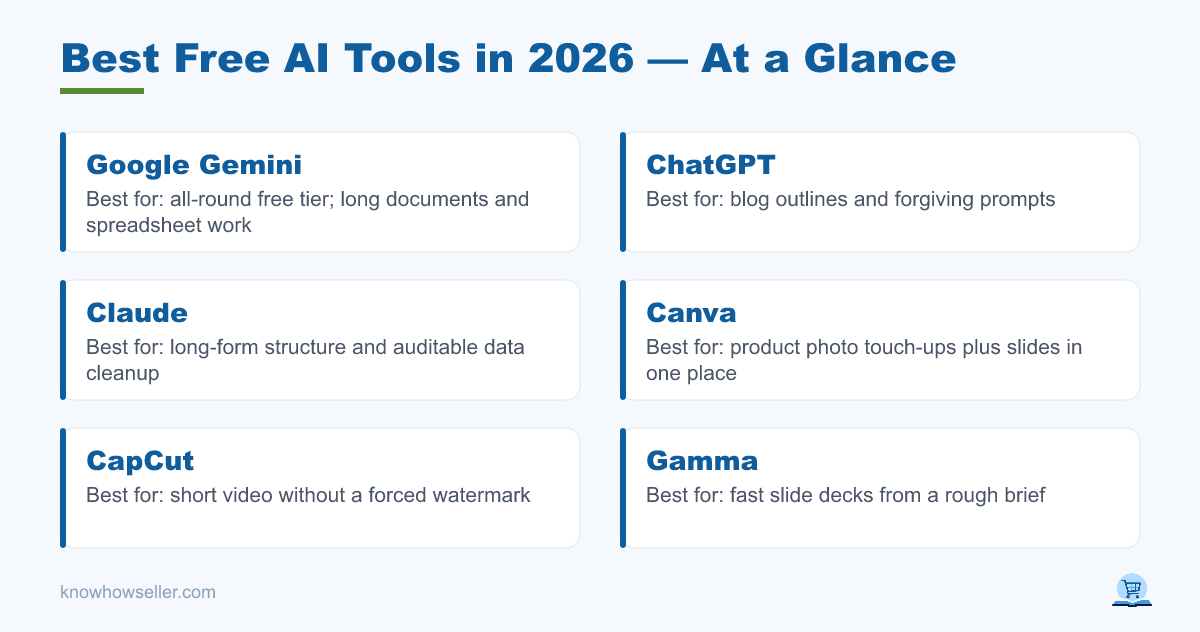
Seven of the 22 free tiers we looked at are worth keeping: Google Gemini, ChatGPT, Claude, Canva, CapCut, Gamma, and Photoroom. Each produced usable output on its core task in our hands-on use, returned a first result quickly, and offers either no forced watermark or clear commercial-use terms on the published free plan.
- Gemini (free) — best all-rounder; strongest on long-document and spreadsheet work.
- ChatGPT (free) — best blog outlines and the most forgiving of sloppy prompts.
- Claude (free) — best at long-form structure and data cleanup logic you can audit.
- Canva (free) — best for product photo touch-ups plus slides in one place.
- CapCut (free) — best short video without a forced watermark on a basic edit.
- Gamma (free) — fastest usable slide deck from a rough brief.
- Photoroom (free) — best background removal and product-on-white output.
How did we compare 22 free AI tools?
This is a hands-on comparison and a documentation review, not a controlled benchmark. We used a free account for each tool against the same five jobs — a 1,500-word blog outline, a product photo edit, a short social video, a five-slide deck, and a spreadsheet cleanup — and then read each vendor’s current free-plan terms for the things that actually decide whether you can ship: credits before the paywall, watermark and commercial rights, and export limits.
Two rules kept it fair. First, the same prompts everywhere — no per-tool prompt engineering. Second, tools were only asked to do jobs they actually claim to support. Because we are not publishing scores from a controlled test, the judgements below are editorial: what we found usable, stated as an opinion, with the plan facts stated separately so you can verify them.
Plan details reflect each vendor’s published free tier as of August 2026. Free tiers change often — treat this as a snapshot and confirm current limits before you build a workflow on one.
Full comparison: 22 free AI tools
Ordered with our seven picks first, then the rest. The order is an editorial grouping, not a score.
| Tool | Best-fit task | Free allowance before paywall (as published) | Watermark / commercial use | Export limits |
|---|---|---|---|---|
| Google Gemini | Data cleanup | Daily message cap on top model | None / allowed | Docs, Sheets, text |
| ChatGPT | Blog outline | Rolling window on advanced model | None / allowed | Text, some file export |
| Claude | Blog outline | Usage resets every few hours | None / allowed | Text, artifacts |
| Canva | Slide deck | Limited monthly AI credit pool | None on free templates / allowed | PNG, PDF; some assets locked |
| CapCut | Short video | Most editing free; AI features metered | No forced watermark on a basic edit; templates and AI assets carry their own terms | 1080p export |
| Gamma | Slide deck | One-time credit grant | Badge on free exports | PDF/PPTX with branding |
| Photoroom | Product photo | Daily edit cap | None / allowed | Reduced resolution on free |
| Microsoft Copilot | Blog outline | Daily cap | None / allowed | Office export gated by plan |
| Perplexity | Research outline | Limited advanced searches/day | None / allowed | Text, citations |
| Adobe Firefly | Product photo | Monthly generative credits | Content Credentials tag attached | Web-res on free |
| Krea | Product photo | Daily generation cap | Free tier restricted — check current terms | Standard resolution |
| Ideogram | Product photo (text) | Daily slow-queue generations | Free generations public by default | Standard resolution |
| Mistral Le Chat | Blog outline | Generous chat cap | None / allowed | Text |
| DeepSeek | Data cleanup | Generous, variable | None / allowed | Text |
| Leonardo | Product photo | Daily token refill | Free tier non-commercial | Upscale gated |
| Julius AI | Data cleanup | Limited messages/month | None / allowed | CSV export gated |
| Cleanup.pictures | Product photo | Unlimited at reduced resolution | None / allowed | Resolution capped on free |
| Rows | Data cleanup | Monthly AI action cap | None / allowed | Row limits |
| Luma Dream Machine | Short video | Few generations/month | Watermarked | Short clips only |
| Kling | Short video | Daily credit drip | Watermarked | Short clips only on free |
| Runway | Short video | One-time credit grant, no refill | Watermarked | Reduced resolution, short clips |
| Pika | Short video | Monthly credit pool | Watermarked | Short clips only |
Which free AI tools fit each of the five tasks?
Our picks: ChatGPT or Claude for the blog outline, Photoroom for the product photo edit, CapCut for the short video, Gamma for the slide deck, and Gemini for the data cleanup. No single free tool was our first choice in more than one category — which is the most useful takeaway here.
- Blog outline: the top three chat models are close enough that output quality is not the deciding factor. Pick on usage caps, not prose.
- Product photo: specialist beat generalist. Photoroom cuts a clean edge in seconds; general image models tend to re-render the product and change it.
- Short video: every dedicated free video generator we looked at watermarks its output, per the vendors’ own free-plan terms. Only editor-first CapCut gave us a clean clip.
- Slide deck: Gamma got to a usable draft fastest; Canva wins on export freedom.
- Data cleanup: we preferred the tools that show their transformation steps, so the work can be checked. Tools that silently “fix” rows were the least trustworthy.
Where do free AI tiers actually stop you?
Not at quality — at three chokepoints: credits, watermarks, and export resolution. In our hands-on use, free-tier output was often close enough to the paid result for draft work, but most of the tools restricted what we could legally or practically ship. The paywall in 2026 is largely about distribution rights, not intelligence.
That gap is the point. Stanford HAI’s AI Index has documented an enormous fall in inference cost — roughly a 280-fold drop for GPT-3.5-level performance between late 2022 and late 2024 — which is why capable models can be given away at all. Vendors recover margin at the export button instead. Andreessen Horowitz’s recurring Top 100 Gen AI Consumer Apps ranking shows the same shape: the leading consumer apps are predominantly free-to-start, competing on funnel rather than on locking away the model.
“The question I ask now isn’t can the free version do it — it usually can. It’s can I publish what comes out. Almost every tool clears the first bar. Far fewer clear the second.” — Knowhow Seller
Are free AI tools safe for commercial work?
Sometimes. Across the 22 tools, some grant commercial use on the free tier, some restrict it to paid plans, and others allow it but attach a watermark or a provenance tag. The terms differ per tool and change without notice, so always read the current terms for your specific plan before using output in a paid client deliverable.
Three practical rules:
- Watermark ≠ licence. Some tools watermark but permit commercial use; others are clean but non-commercial on free. Check both separately.
- Provenance tags (like Content Credentials) are metadata, not a restriction — but some platforms surface them to viewers.
- If a tool’s free terms are vague, treat the output as a draft input, not a shippable asset.
Which 15 tools didn’t make the cut, and why?
They failed on shipping, not thinking. The four dedicated free video generators all watermark output and ration credits hard enough that a single serious clip can consume most of a month’s allowance. The mid-pack image models re-imagined products instead of editing them. The free data tools cap exports exactly where the work becomes useful.
A few near-misses deserve a mention: Perplexity is excellent for sourced research outlines and only lost out because it isn’t built for the other four tasks. Mistral Le Chat was among the quickest to respond in our use. DeepSeek handled data reasoning well at generous limits, with the usual caveat that you should not paste confidential data into any free tier, regardless of vendor.
We also want to be explicit about the limits of this piece: this is a hands-on comparison plus a read of each vendor’s published terms, not a controlled benchmark with repeated runs. Generative output varies from attempt to attempt, so treat the picks as informed opinion and the plan details as the verifiable part.
How should you stack free AI tools without paying?
Use one chat model as your hub and three specialists around it. In our use, the combination of Gemini or ChatGPT for text and data, Photoroom for images, CapCut for video, and Gamma or Canva for decks covered all five tasks at zero cost — with clean exports on most of them.
- Pick one hub, not three. Splitting across chat models burns your attention, not your credits.
- Spend credits on the bottleneck. Free video credits are the scarcest resource in the entire stack — save them for the one clip that matters.
- Do the rough draft free, the final pass manually. Every workflow we liked ended with a human edit, not an export.
- Re-check limits quarterly. Several of these tools changed their free allowance while this piece was being written.
The honest summary of 2026: free AI tools are good enough to do the work, and deliberately awkward at the moment you try to ship it. Knowing exactly where each one gets awkward is worth more than another list of logos.